
Below the article is a video tutorial on using Yoast SEO.
The Yoast SEO plugin will help you improve your website's SEO. After installing it, you will be able to add individual SEO content:
- Title
- Meta Description
- Slug / URL / link
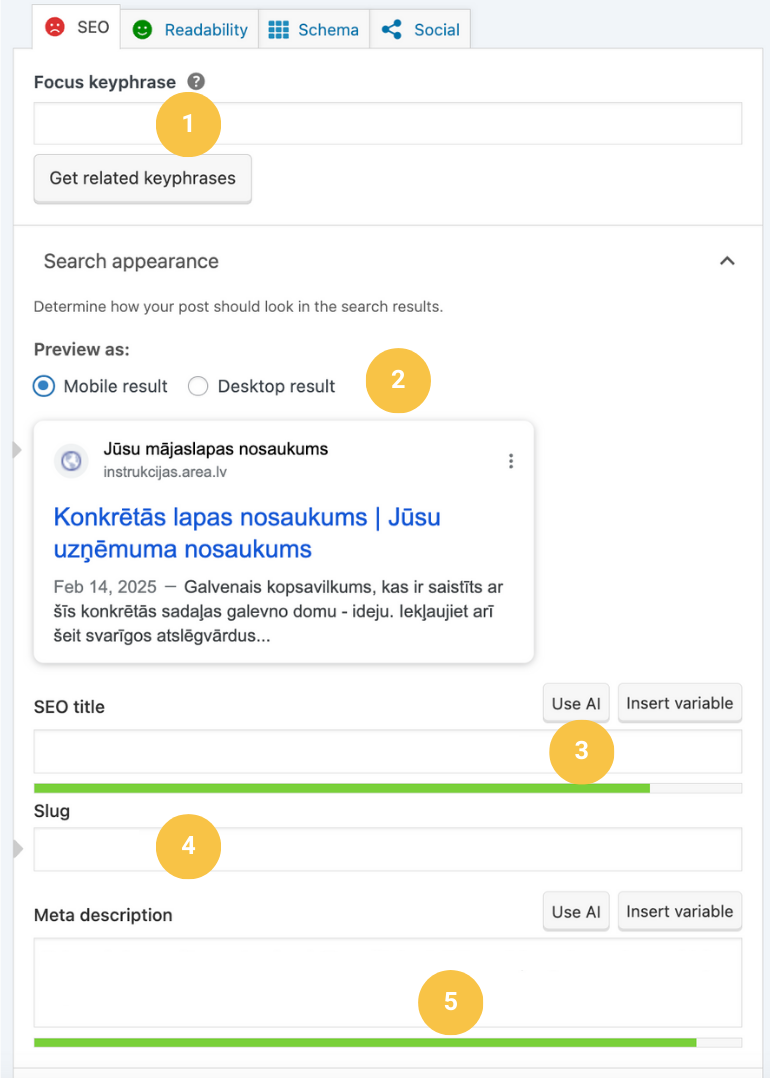
You will see the following information block after installing Yoast SEO under each section and each article. Ideally, you will fill each of them individually with the appropriate information. On the website of our cooperation partners, you can read more about creating SEO content, including how to create a Title and Meta description.
Here you can enter the focus keyword / phrase of a specific website section or article
- Here you can see how your website link will look on the desktop or mobile version
- SEO title - the SEO title of a specific section / article - it is important to observe the length of the text and also add the name of your company. Try to include important keywords in it.
- Slug / URL / link - here you can adjust the link, for example, this is important for articles if it is too long.
- Meta description - description. This briefly summarizes the information contained in this section.
- In the example, the first face is red, as this is an example, however, you are advised to make it at least yellow/orange.
How to use Yoast SEO?